Developer Guide
- Acknowledgements
- Setting up, getting started
- Design
- Implementation
- Documentation, logging, testing, configuration, dev-ops
- Appendix: Requirements
- Appendix: Instructions for manual testing
- Appendix: Planned Enhancements
Acknowledgements
- This project is based on the AddressBook-Level3 project created by the SE-EDU initiative.
Setting up, getting started
Refer to the guide Setting up and getting started.
Design
 Tip: The
 .puml files used to create diagrams in this document docs/diagrams folder. Refer to the PlantUML Tutorial at se-edu/guides to learn how to create and edit diagrams.
Architecture
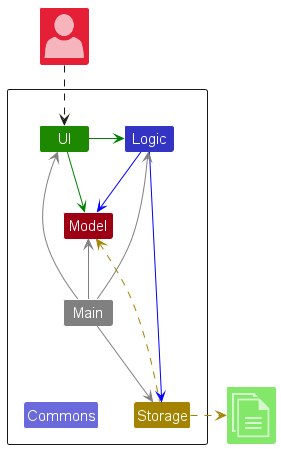
The Architecture Diagram given above explains the high-level design of the App.
Given below is a quick overview of main components and how they interact with each other.
Main components of the architecture
Main (consisting of classes Main and MainApp) is in charge of the app launch and shut down.
- At app launch, it initializes the other components in the correct sequence, and connects them up with each other.
- At shut down, it shuts down the other components and invokes cleanup methods where necessary.
The bulk of the app’s work is done by the following four components:
-
UI: The UI of the App. -
Logic: The command executor. -
Model: Holds the data of the App in memory. -
Storage: Reads data from, and writes data to, the hard disk.
Commons represents a collection of classes used by multiple other components.
How the architecture components interact with each other
The Sequence Diagram below shows how the components interact with each other for the scenario where the user issues the command delete 1.
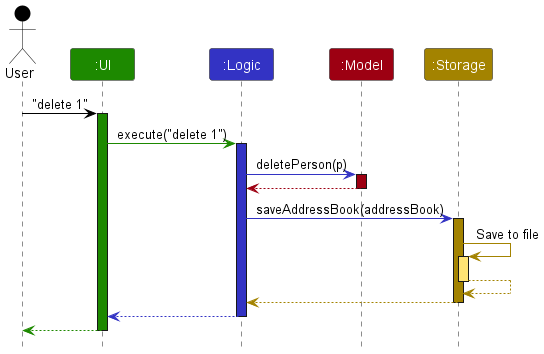
Each of the four main components (also shown in the diagram above),
- defines its API in an
interfacewith the same name as the Component. - implements its functionality using a concrete
{Component Name}Managerclass (which follows the corresponding APIinterfacementioned in the previous point.
For example, the Logic component defines its API in the Logic.java interface and implements its functionality using the LogicManager.java class which follows the Logic interface. Other components interact with a given component through its interface rather than the concrete class (reason: to prevent outside component’s being coupled to the implementation of a component), as illustrated in the (partial) class diagram below.
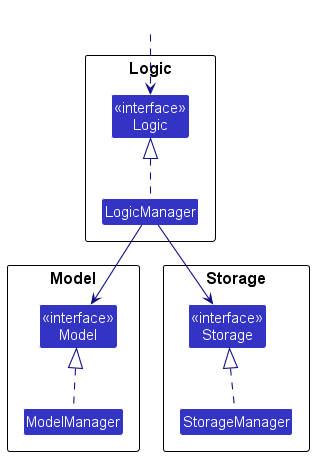
The sections below give more details of each component.
UI component
The API of this component is specified in Ui.java
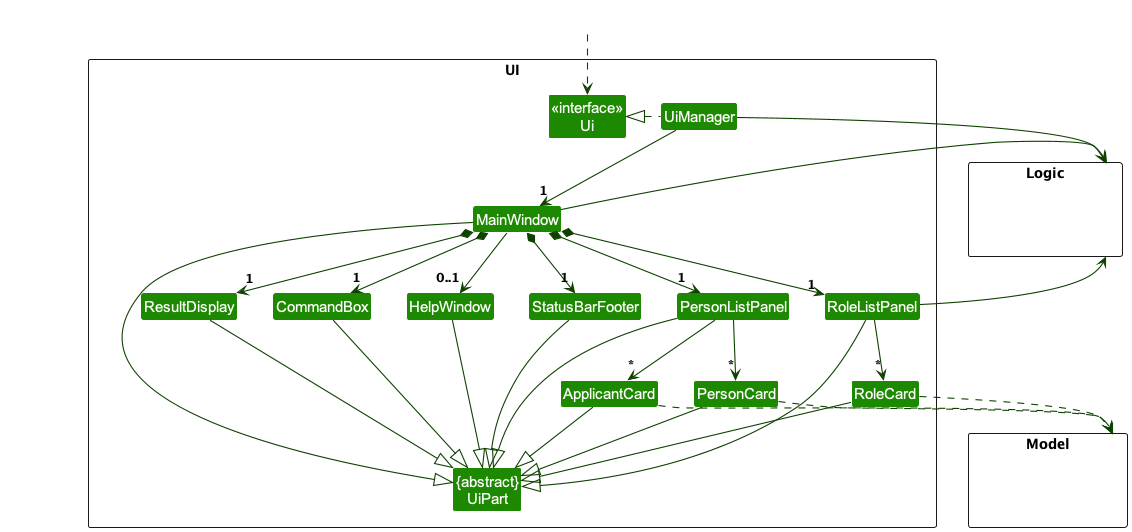
The UI consists of a MainWindow that is made up of parts e.g.CommandBox, ResultDisplay, PersonListPanel, RoleListPanel, StatusBarFooter etc. All these, including the MainWindow, inherit from the abstract UiPart class which captures the commonalities between classes that represent parts of the visible GUI.
The UI component uses the JavaFx UI framework. The layout of these UI parts are defined in matching .fxml files that are in the src/main/resources/view folder. For example, the layout of the MainWindow is specified in MainWindow.fxml
The UI component,
- executes user commands using the
Logiccomponent. - listens for changes to
Modeldata so that the UI can be updated with the modified data. - keeps a reference to the
Logiccomponent, because theUIrelies on theLogicto execute commands. - depends on some classes in the
Modelcomponent, as it displaysPersonobject residing in theModel.
Logic component
API : Logic.java
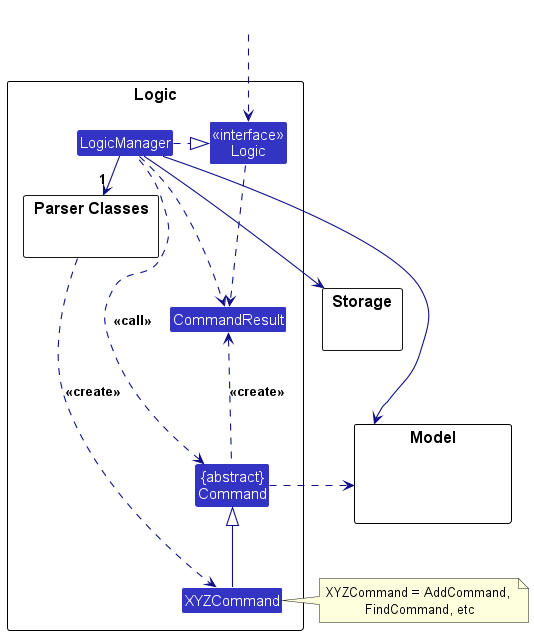
Here’s a (partial) class diagram of the Logic component:
The sequence diagram below illustrates the interactions within the Logic component, taking execute("delete 1") API call as an example.
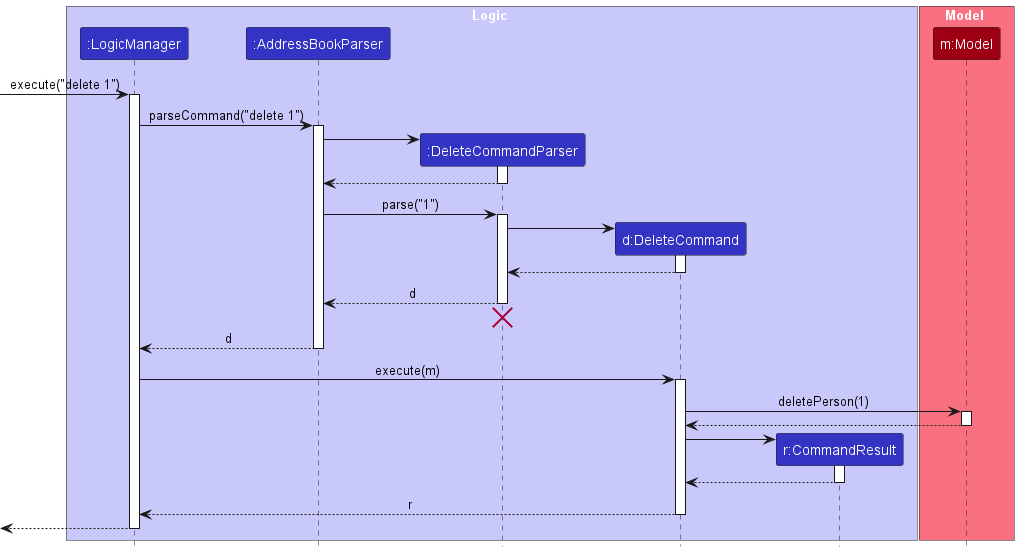
 Note: The lifeline for
 DeleteCommandParser should end at the destroy marker (X) but due to a limitation of PlantUML, the lifeline continues till the end of diagram.
How the Logic component works:
- When
Logicis called upon to execute a command, it is passed to anAddressBookParserobject which in turn creates a parser that matches the command (e.g.,DeleteCommandParser) and uses it to parse the command. - This results in a
Commandobject (more precisely, an object of one of its subclasses e.g.,DeleteCommand) which is executed by theLogicManager. - The command can communicate with the
Modelwhen it is executed (e.g. to delete a person).
Note that although this is shown as a single step in the diagram above (for simplicity), in the code it can take several interactions (between the command object and theModel) to achieve. - The result of the command execution is encapsulated as a
CommandResultobject which is returned back fromLogic.
Here are the other classes in Logic (omitted from the class diagram above) that are used for parsing a user command:
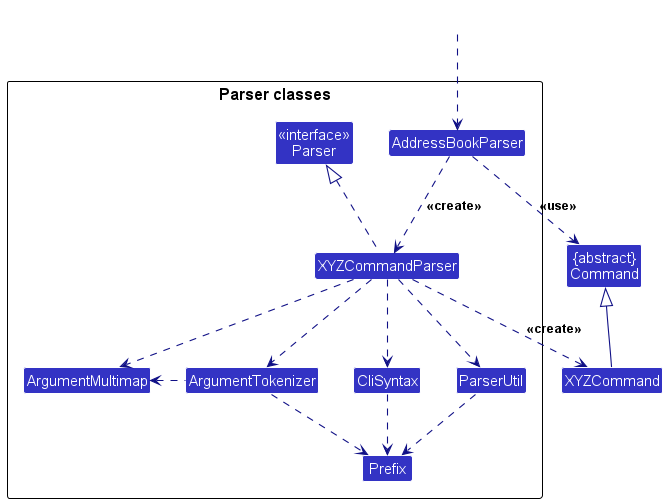
How the parsing works:
- When called upon to parse a user command, the
AddressBookParserclass creates anXYZCommandParser(XYZis a placeholder for the specific command name e.g.,AddCommandParser) which uses the other classes shown above to parse the user command and create aXYZCommandobject (e.g.,AddCommand) which theAddressBookParserreturns back as aCommandobject. - All
XYZCommandParserclasses (e.g.,AddCommandParser,DeleteCommandParser, …) inherit from theParserinterface so that they can be treated similarly where possible e.g, during testing.
Model component
API : Model.java
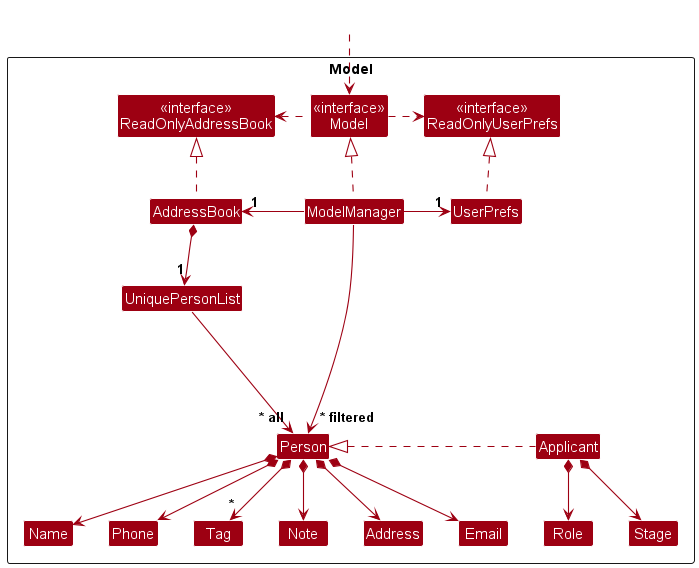
The Model component,
- stores the address book data i.e., all
Personobjects (which are contained in aUniquePersonListobject). - stores the currently ‘selected’
Personobjects (e.g., results of a search query) as a separate filtered list which is exposed to outsiders as an unmodifiableObservableList<Person>that can be ‘observed’ e.g. the UI can be bound to this list so that the UI automatically updates when the data in the list change. - stores a
UserPrefobject that represents the user’s preferences. This is exposed to the outside as aReadOnlyUserPrefobjects. - does not depend on any of the other three components (as the
Modelrepresents data entities of the domain, they should make sense on their own without depending on other components)
Note: An alternative (arguably, a more OOP) model is given below. It has a Tag list in the AddressBook, which Person references. This allows AddressBook to only require one Tag object per unique tag, instead of each Person needing their own Tag objects.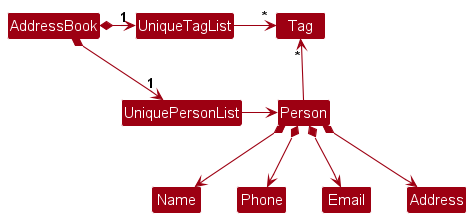
Storage component
API : Storage.java
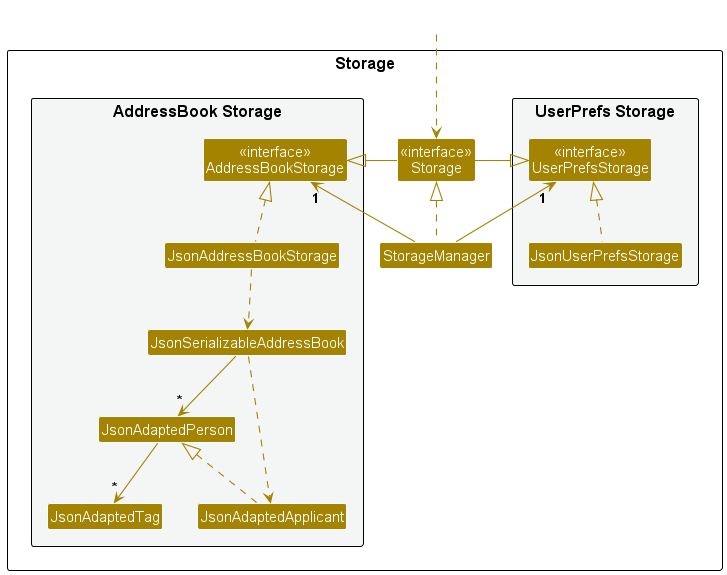
The Storage component,
- can save both address book data and user preference data in JSON format, and read them back into corresponding objects.
- inherits from both
AddressBookStorageandUserPrefStorage, which means it can be treated as either one (if only the functionality of only one is needed). - depends on some classes in the
Modelcomponent (because theStoragecomponent’s job is to save/retrieve objects that belong to theModel)
Common classes
Classes used by multiple components are in the seedu.addressbook.commons package.
Implementation
This section describes some noteworthy details on how certain features are implemented.
[Developed] Applicant class OOP modeling
Why it is implemented that way
By extending Person, the ModelManager and AddressBook classes can remain the same handling person
(as observed in the diagram in Model component). Since Applicant is also a person with additional fields, it makes
sense for the model to have Applicant class extend Person and composing of classes like Role and Stage which are
the new details we are tracking.
Similarly, a JsonAdaptedApplicant extends JsonAdaptedPerson to achieve
the same effect in Storage component.
[Developed] Add applicant feature
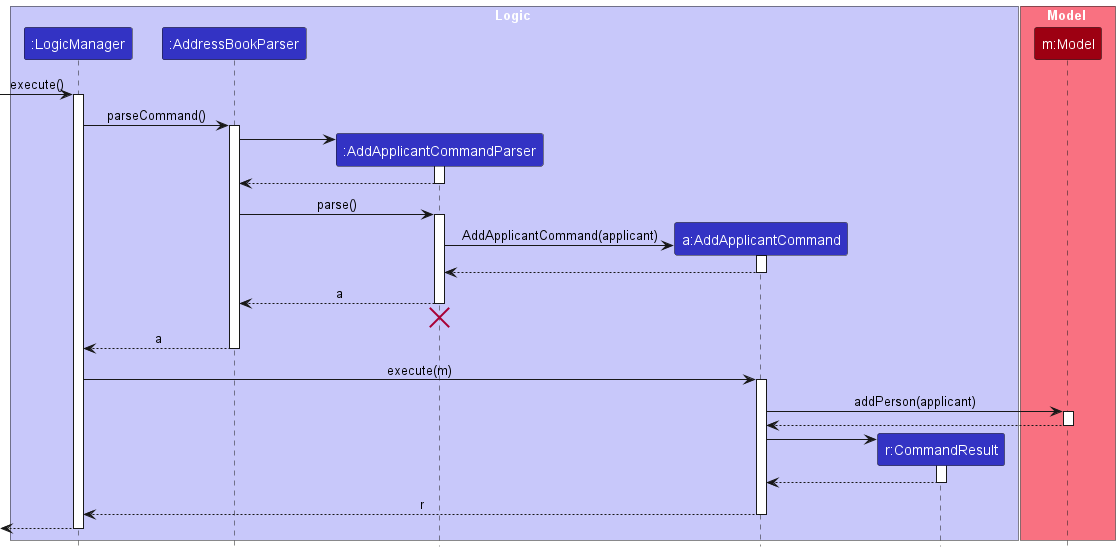
The add applicant feature allows users to add applicants with the following details: Name, Phone, Email,
Address, Role, Tag, Note and Date.
How the feature is implemented
- The add applicant is designed in mind with how the
Applicantclass extendsPersonclass to maximize the benefits of inheritance. - In the add applicant command and parser, the applicant is parse to into
addPerson()asApplicant. - In the
JsonAdaptedPersonclass, subtype declarators are used to declare the inheritance relationship between person and applicant, hence it can store and differentiate applicants from person when retrieved. - There is also an input checker reminding users to not declare
/stage(if they did) as newly added applicants are assumed to be at the'Initial Application'stage. - Instance check are done for
ApplicantatpersonListPanelto ensure the applicant card gets displayed andJsonSerializableAddressBookclass to ensure the person objects that areApplicantare casted accordingly.
[Developed] Edit applicant feature
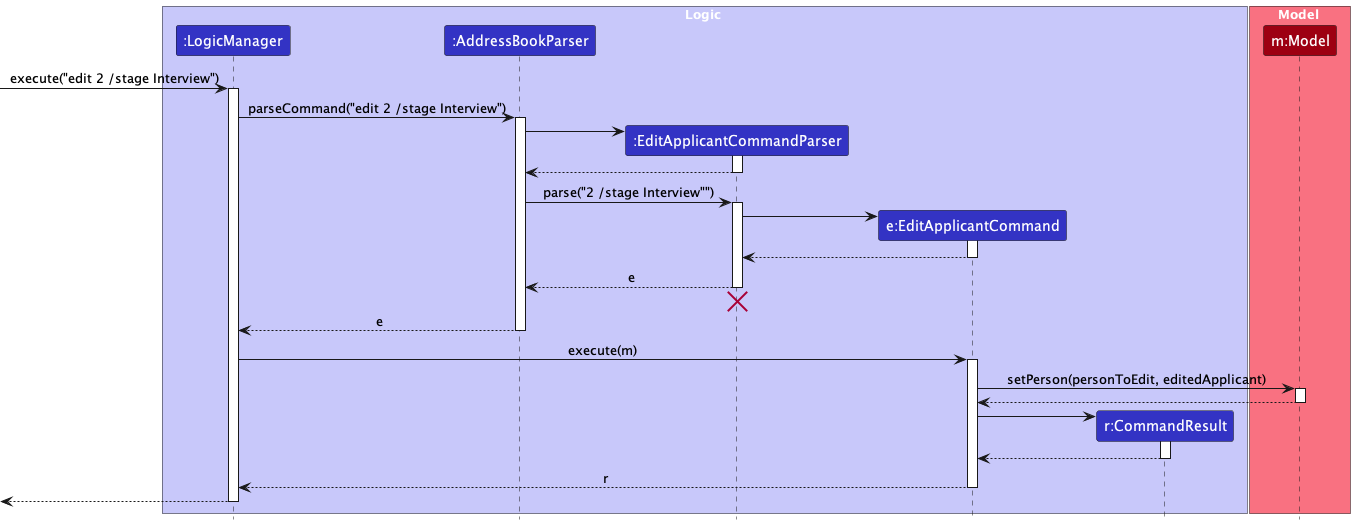
The edit command gives users the ability to edit the applicants’ details. The details that can be edited include Name, Phone, Email, Address, Stage, Role, Note and Tag. Note that at least one field has to be chosen.
How the feature is implemented
- The
editis implemented using theEditApplicantCommand,EditApplicantDescriptorandEditApplicantCommandParserclasses. - The
EditApplicantCommandreceives an index of the applicant to be edited and an EditApplicantDescriptor class which consists of the updated fields of the applicant. - Note that checks will be done on the fields that the user want to input to ensure is valid. For example,
Stagecan only be one of the four formsInitial Application,Technical Assessment,Interview,Decision & Offer. Hence, if user was to inputedit 1 /stage WaitListed, this will not be possible and the applicant will not be edited. - Similarly, a check will be done to ensure that the index is valid.
[Developed] Note feature
- The
notecommand gives users the ability to add notes to applicants. There is also an option to add a timestamp to the note to date it. - Arguments for this command is
note,index, anddate, wherenoteis the note content,indexbeing which applicant in the list to add to, anddateto specify whether the timestamp should be added. - An example usage of the command is
note 1 /note Buy groceries /date true
This feature is implemented by first adding an additional Note property to the Person model, as illustrated by the UML diagram below:

- This allows the
Noteproperty to be stored in thePersonmodel for further manipulation during program runtime. -
Then, the
storagecomponent is modified to also include theNoteproperty, so that when the program saves the applicant, theNotewill also be saved intoaddressbook.json -
The following class diagram shows the design of the
Notecommand: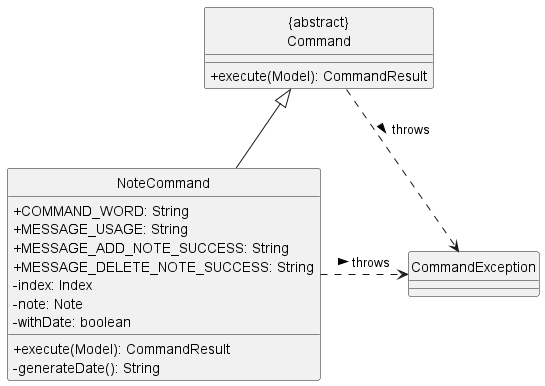
- As mentioned earlier, the
Notecommand has an optionaldatethat can be attached to anote. - In the class diagram above, the toggle for adding the
dateis stored as a booleanwithDate. - When
withDateis set to true, a dateStringis then generated whengenerateDate()is called. - The reason for not saving the
dateas an actual date related data type is due to the fact that it will always default to the current timestamp when the note is added. - For convenience and to avoid the need to cast date datatype, the actual
datefor the note is stored as aString, which can be directly saved into.jsonfiles.
Design considerations:
Aspect: How Note dates are stored:
-
Alternative 1 (current choice): Simply stored as a
String.- Pros: Straightforward and easy.
- Cons: Is not searchable/sortable unlike actual date datatype.
-
Alternative 2: Store date with proper date datatype.
- Pros: Can be searchable/sortable in the future if the need arises.
- Cons: Takes more time to implement as it needs to be added to Model, Storage, and
NoteCommandneeds to be modified.
[Developed] Import feature
The import command allows users to import the applicants’ contacts easily. The command opens an import window with file selector feature to have the user select a file.
Once a file is selected and user clicks on import, an import_file command is sent along with the filepath.
This enables users that are less tech-savvy to use the GUI to select the file while users confident with directly typing out the filepath to use the import_file command directly.
Only json file exported from HRConnect will be recognised.
Why is it implemented that way
HRConnect is a CLI-optimised application and the optimal choice was to implement a CLI command that takes in a file path to
import file than just directly importing contacts to Logic straight from the MainWindow. This reduces direct coupling from
the UI to the logic components and maintains the facade design pattern.
Documentation, logging, testing, configuration, dev-ops
Appendix: Requirements
Product scope
Target user profile: HR officer for tech-related startup
Value proposition:
- HRConnect enables HR officers to efficiently organise applicants based on the hiring process.
- Streamlines recruitment through filtering of applicants.
- Ease of contact management with CLI commands.
User stories
Priorities: Essential (needed for basic functionality) - Essential, Typical (common needs) - Typical, Novel (good to have but not a need) - Novel, Out of Scope (not needed) - Out of Scope
| As a/an … | I can … | So that … | Priority (Essential, Typical, Novel, Out of Scope) |
|---|---|---|---|
| User | add new contacts | Essential | |
| User | delete existing contacts | Essential | |
| User | view existing contacts | Essential | |
| HR professional | manage all my work contacts in one place, | I can efficiently communicate with applicants | Essential |
| User | update existing contacts | Typical | |
| User | purge all curent data | I can get rid of sample/experimental data I while exploring the app | Typical |
| HR Recruiter | filter through my contact list based on what stage of the hiring process the applicants are in | I can contact those who are shortlisted | Typical |
| HR Recruiter | add tags to contacts to specify which roles they are applying for | I can keep them organized | Typical |
| HR personnel | add notes or comments to individual contact entries | I can keep track of important additional information/interactions | Typical |
| experienced HR professional | filter and identify candidates by tags | I can follow up with them promptly | Typical |
| User | search through my contacts based on specific criteria | I can quickly find any information I need | Typical |
| HR Recruiter | extract contacts into a separate address book | I can import them to the company database easily | Typical |
| HR Recruiter | upload images to set profile pictures for my contacts | I can identify them when face to face | Typical |
| first-time user | have an intuitive experience and can quickly understand its features and functionalities | I can start using it effectively without wasting time | Typical |
| first-time user | can find clear instructions on how to use HRConnect | I can easily start managing my contacts using HRConnect | Typical |
| HR Recruiter | Create new contacts with templates based on person (employees, intern, interviewee etc.) | Novel | |
| long-time user | create shortcuts for tasks | I can save time on frequenty used functions | Novel |
| User | receive notifications or reminders from HRConnect | I can be kept up to date with upcoming interviews, deadlines or follow-up tasks | Novel |
| User | can conduct background checks on potential hires directly within HRConnect | I can find out the suitability of a candidate easily | Novel |
| first-time user | easily import my data | it won’t be intimidating and I won’t give up on using it after my first use | Novel |
| HR personnel | sync any information changes across different devices | I can update information efficiently and ensure that all data is up to date for my coworkers as well | Novel |
| long-time user. | archive/hide unused contacts | I am not distracted by irrelevant data | Novel |
| HR Recruiter | create custom automated processes for repetitive tasks | I can save time on such tasks | Novel |
| potential user exploring the app | see the app populated with sample data | I can easily see the benefits of the app when frequently used | Novel |
| HR personnel | keep track of the status of job applications or recruitment processes for each candidate | I can monitor progress and follow up as needed | Novel |
| User | track the status of each potential hire in the recruitment process | I can take action as needed | Novel |
| User | conduct surveys and collect feedback from specific groups within my contacts | I can easily conduct surveys as needed | Novel |
| first-time user | access a brief tutorial on how to navigate HRConnect | I can quickly familiarize myself with its features and functions | Out of scope |
| User | generate reports or analytics on hiring activities such as time-to-fill metrics, source of hire, and diversity statistics | I can easily access such information as needed | Out of scope |
| User | integrate HRConnect with other HR systems or tools such as applicant tracking systems or payroll software | data exchange and workflows can be streamlined | Out of scope |
| User | schedule and conduct virtual interviews directly within HRConnect, including video conferencing and interview notes | Out of scope | |
| User | track and manage employee referrals and incentives programs within HRConnect, including tracking referral bonuses and monitoring the effectiveness of referral campaigns | Out of scope | |
| User | generate customizable offer letters and employment contracts directly within HRConnect, including integrating e-signature solutions | I can perform these tasks more efficiently | Out of scope |
| User | create and manage employee development plans with HRConnect | Out of scope | |
| User | create and manage succession plans with HRConnect, including identifying high-potential employees, mapping career paths and planning for leadership transitions | Out of scope |
Use cases
(For all use cases below, the System is the HRConnect and the Actor is the user, unless specified otherwise)
Use case: Add an applicant
MSS
- User requests to list of contacts
- HRConnect shows a list of contacts
- User requests to add a specific contact to the list
-
HRConnect adds the contact
Use case ends.
Extensions
-
3a. The given format is invalid.
-
3a1. HRConnect shows an error message.
Use case resumes at step 2.
-
-
3b. The unnecessary fields given.
-
3b1. HRConnect shows an error message.
Use case resumes at step 2.
-
-
3c. The contact details have been added before.
-
3c1. HRConnect shows an error message.
Use case resumes at step 2.
-
Use case: Clear
MSS
- User requests to list of contacts
- HRConnect shows a list of contacts
- User requests to clear the list
-
HRConnect deletes all entries in list
Use case ends.
Extensions
-
2a. The list is empty.
Use case ends.
Use case: Add comment to contact
MSS
- User requests to list of contacts
- HRConnect shows a list of contacts
- User requests to add a comment to a specific person in the list
-
HRConnect adds comment to the person
Use case ends.
Extensions
-
2a. The list is empty.
Use case ends.
-
3a. The given Application ID is invalid.
-
3a1. HRConnect shows an error message.
Use case resumes at step 2.
-
-
3b. The comment is empty.
-
3b1. HRConnect shows an error message.
Use case resumes at step 2.
-
-
3c. The comment is a duplicate of a previous comment assigned to the same contact.
-
3c1. HRConnect shows an error message.
Use case resumes at step 2.
-
Use case: Delete a contact
MSS
- User requests to list of contacts
- HRConnect shows a list of contacts
- User requests to delete a specific contact on the list
-
HRConnect deletes the person
Use case ends.
Extensions
-
2a. The list is empty.
Use case ends.
-
3a. The given index is invalid.
-
3a1. HRConnect shows an error message.
Use case resumes at step 2.
-
Use case: Edit an applicant
MSS
- User requests to list of contacts
- HRConnect shows a list of contacts
- User requests to edit a specific applicant’s details in the list
-
HRConnect edits the details belonging to the applicant
Use case ends.
Extensions
-
2a. The list is empty.
Use case ends.
-
3a. The given index of the applicant is invalid.
-
3a1. HRConnect shows an error message.
Use case resumes at step 2.
-
-
3b. The given format of the command is invalid.
-
3b1. HRConnect shows an error message.
Use case resumes at step 2.
-
-
3c. Newly applied changes were the same as before.
-
3c1. HRConnect shows an error message.
Use case resumes at step 2.
-
-
3d. The applicant already exists in HRConnect.
-
3d1. HRConnect shows an error message.
Use case resumes at step 2.
-
Use case: Export contacts
MSS
- User requests to list of contacts
- HRConnect shows a list of contacts
- User requests to export contacts into a separate address book section.
-
HRConnect exports the specified range of contacts to the designated page.
Use case ends.
Extensions
-
2a. The list is empty.
Use case ends
-
3a. The given format of the command is invalid.
-
3a1. HRConnect shows an error message.
Use case resumes at step 2.
-
-
3b. The given range is invalid.
-
3b1. HRConnect shows an error message.
Use case resumes at step 2.
-
Use case: Filter Tag
MSS
- User requests to list of contacts
- HRConnect shows a list of contacts
- User requests to filter through the contact list based on what stage the interviewee is in
-
HRConnect returns entries only for interviewees in that particular stage.
Use case ends.
Extensions
-
2a. The list is empty.
Use case ends
-
3a. The given format of the command is invalid.
-
3a1. HRConnect shows an error message.
Use case resumes at step 2.
-
-
3b. The tag does not exist.
-
3b1. HRConnect shows an error message.
Use case resumes at step 2.
-
Use case: Find keyword
MSS
- User requests to list of contacts
- HRConnect shows a list of contacts
- User requests to find entries that match the keyword in the list
-
HRConnect returns entries that match the keyword
Use case ends.
Extensions
-
2a. The list is empty.
Use case ends
Use case: List
MSS
- User requests to list persons
-
HRConnect shows a list of persons
Use case ends.
Extensions
-
2a. The list is empty.
Use case ends
Use case: Add tag
MSS
- User requests to list of contacts
- HRConnect shows a list of contacts
- User requests to add specific tags to specific contacts for easy filtering later.
-
HRConnect adds the specified tag to the designated contact.
Use case ends.
Extensions
-
2a. The list is empty.
-
3a. The application ID does not exist.
-
3a1. HRConnect shows an error message.
Use case resumes at step 2.
-
-
3b. The tag does not exist.
-
3b1. HRConnect shows an error message.
Use case resumes at step 2.
Use case ends
-
Use case: Import contacts (through GUI)
MSS
- User requests to import new contacts
- System prompts the user to select file
- User selects the file containing the contacts
- System adds new contacts into the current lists
- System shows the lists of contacts
Use case ends.
Extensions
-
2a. The file is invalid or no file selected.
-
2a1. System shows an error message.
Use case resumes at step 1.
-
Use case: Import contacts (through CLI)
MSS
- User requests to import new contacts and enters the file path
- System adds new contacts into the current lists
- System shows the lists of contacts
Use case ends.
Extensions
-
1a. File selected is incorrect or no file is selected.
-
1a1. HRConnect shows an error message.
Use case resumes at step 1.
-
Non-Functional Requirements
- Should work on any mainstream OS as long as it has Java
11or above installed. - Should be able to hold up to 1000 persons without a noticeable sluggishness in performance for typical usage.
- A user with above average typing speed for regular English text (i.e. not code, not system admin commands) should be able to accomplish most of the tasks faster using commands than using the mouse.
- Searches, additions, and updates to contacts should be processed within 2 seconds under normal operational conditions.
- HRConnect should feature an intuitive user interface for easy management of contacts without prior training.
- The system should provide clear error messages and guidance for correcting invalid inputs.
- The system should be designed to scale horizontally to accommodate growing numbers of users and contacts.
- It should maintain performance and usability as data volume and number of concurrent users increase.
- HRConnect should be available 24/7 with a target uptime of 99.9%, excluding scheduled maintenance.
- It should include mechanisms for data backup and recovery to prevent data loss.
- The system should be compatible with major operating systems (Windows, macOS, Linux) and browsers (Chrome, Firefox, Safari).
- The application should be built using modular, well-documented code to facilitate maintenance and future updates.
- It should allow for the easy addition of new features without significant restructuring of the existing codebase.
Glossary
- Mainstream OS: Windows, Linux, Unix, MacOS
- Applicants: People who are applying to the company
- Time-to-fill: The time taken to find and hire a new candidate
Appendix: Instructions for manual testing
Given below are instructions to test the app manually.
Note: These instructions only provide a starting point for testers to work on;
testers are expected to do more exploratory testing.
Launch and shutdown
-
Initial launch
-
Download the jar file and copy into an empty folder
-
Double-click the jar file Expected: Shows the GUI with a set of sample contacts. The window size may not be optimum.
-
-
Saving window preferences
-
Resize the window to an optimum size. Move the window to a different location. Close the window.
-
Re-launch the app by double-clicking the jar file.
Expected: The most recent window size and location is retained.
-
Deleting a person
-
Deleting a person while all persons are being shown
-
Prerequisites: List all persons using the
listcommand. Multiple persons in the list. -
Test case:
delete 1
Expected: First contact is deleted from the list. Details of the deleted contact shown in the status message. Timestamp in the status bar is updated. -
Test case:
delete 0
Expected: No person is deleted. Error details shown in the status message. Status bar remains the same. -
Other incorrect delete commands to try:
delete,delete x,...(where x is larger than the list size)
Expected: Similar to previous.
-
Appendix: Planned Enhancements
Note: There are 5 people in our team, allowing us to have 2 x 5 = 10 planned enhancements.
- Make the User Interface (UI) adapt to different window sizes: Currently, the UI can only work at specific sizes, the user may need to adjust the window size such that all the components in the UI are visible during use, or when the application initially boots up. We plan to enhance the UI such that it is able to adapt to different window sizes and not have issues like components not being visible, or having white spaces when the window gets stretched too much.
-
Standardizing Error Messages Related to Index: Some error messages related to commands that utilizes Indexes (e.g
delete,note) do not have standardized error messages. Users may sometimes see “The person index provided is invalid”, or different error messages referring to the same error. We plan to standardize such messages so that they do not cause confusions for user and make the experience when using the application smoother. - Allowing Contacts to Have the Same Name: The application does not support people having the same name, even if they are two completely different person who just happens to have the same name. We plan to update this in the future such that this will become possible as it makes sense in the real world for two or more people to have the same name.
-
Fix Feature Flaws of Profile Picture: The profile picture feature may only work if users follows a very specific set of instructions to generate the
.jsonfile that stores the applicant information. This is due to buggy implementation of said feature, which did not follow the Command design pattern due to an oversight, which is thinking that the feature is a UI feature, so it does not need to follow the design pattern. We plan to fix this such that the feature will be able to work without strict constraints. - UI Text Truncation Issues: When some of the applicant’s information is too long, it gets truncated and does not display properly. We plan to fix this in the future by creating a more robust UI that can adapt to applicant information with long length by displaying such information in a viewable and proper manner.
- Role based Filtering: When a HR Recruiter tries to filter an applicant based on their role, the implementation is prone to bugs due to the errors in handling if-else conditions for filtering based on Stage and Role due to improper code structure. Therefore, this feature extension will be added as a planned enhancement.